
How to set up HotPlayer on iPhone / iPad
A step-by-step guide to watch IPTVin IPTV with HotPlayer on your iPhone / iPad: install the app, sign in with your login details and start streaming.
Follow the steps
- 1
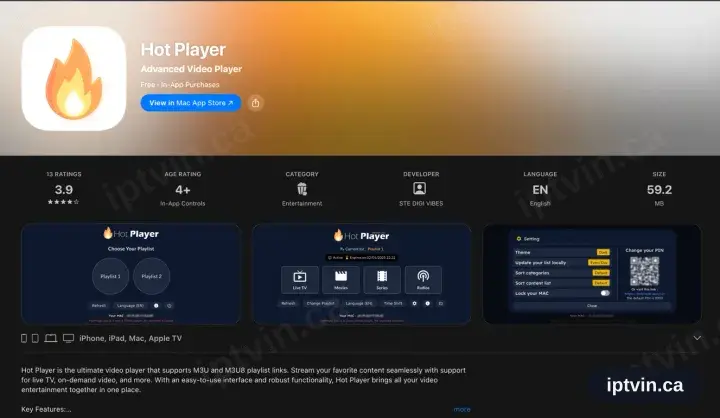
Locate Hot Player in the App Store
On the iPhone or iPad open the App Store, tap Search and enter Hot Player. The download costs nothing and includes a trial; the playlist licence is bought in-app and covers your Apple TV and Mac as well.
- 2
Install, then open Hot Player
Tap Get, wait for it to complete, then launch the app.
- 3
HotPlayer requests a playlist
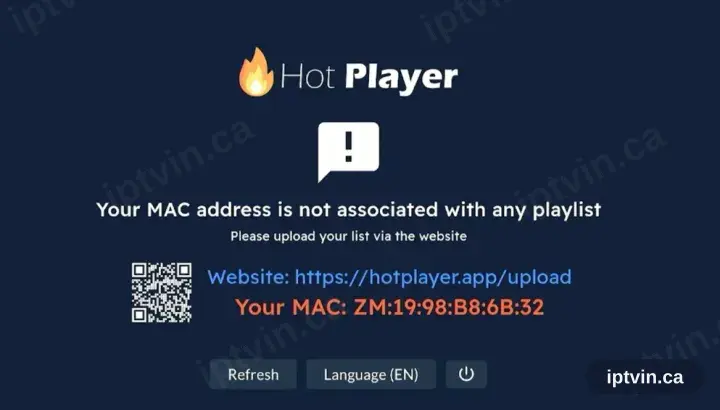
On first launch HotPlayer reports no playlist and displays a device ID alongside hotplayer.app/upload. Leave the screen where it is.
- 4
Register the playlist at hotplayer.app/upload
From a browser, open hotplayer.app/upload. Set the source to Xtream Codes, supply the server URL, username and password from your activation email, and save.
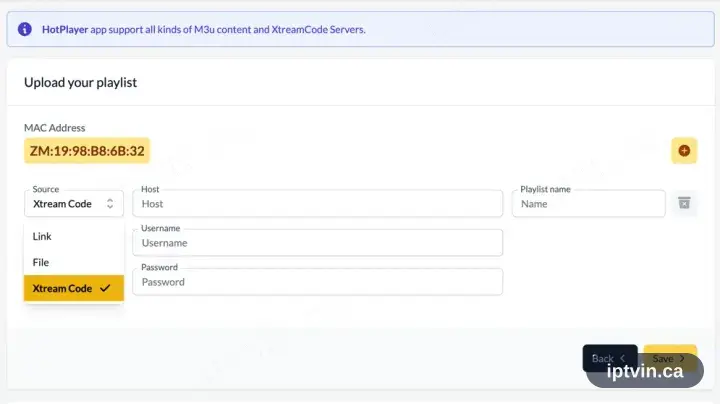
Safari on the same iPhone or iPad handles this fine — the upload page is a website, not part of the app.
- 5
Return to the app and tap Refresh
Back in Hot Player, tap Refresh. The saved playlist is picked up straight away.
- 6
Playback time
The channel list, films and series load in. Select a channel to begin playback.
Installing HotPlayer on iPhone / iPad: what is different
On iPhone and iPad, HotPlayer installs from the iOS App Store — the same Apple ID you already use, no extra account.
iOS players are often a one-off paid download rather than a subscription. That charge is Apple's, separate from your iPhone / iPad playback.
Turn off Low Power Mode before a long match: iOS throttles background networking, which shows up as buffering mid-stream.
Ready to watch, or stuck on a step?
Start with a trial if you do not have a login yet. If something is not working, our team can help in English or French.