
How to set up Ib Player Pro on Samsung TV
A step-by-step guide to watch IPTVin IPTV with Ib Player Pro on your Samsung TV: install the app, sign in with your login details and start streaming.
Follow the steps
- 1
Locate Ib Player Pro in Samsung Apps
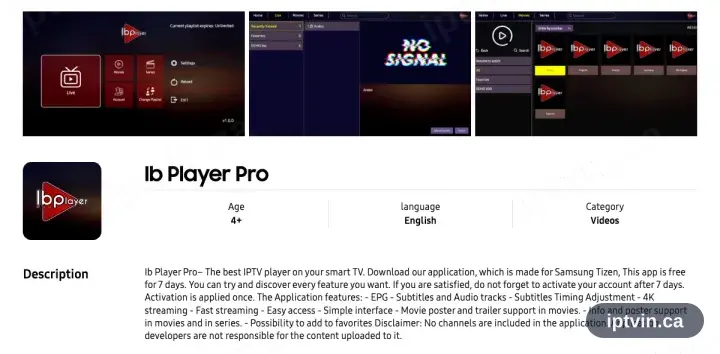
Press Home on the TV, open Apps — the Samsung store — and search Ib Player Pro.
- 2
Install, then open Ib Player Pro
Choose Install, wait for it to complete, then launch the app. Its first screen displays a MAC address and a device key — leave it where it is, both are needed next.
- 3
Sign in at ibplayer.pro
From a browser, open ibplayer.pro/manage-playlists/login and sign in with the MAC address and device key shown on the TV.
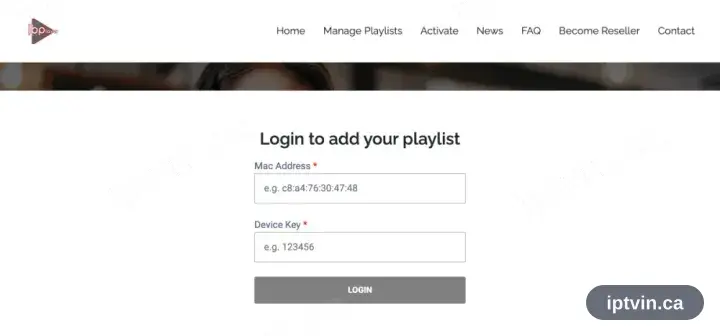
The playlist page is a website rather than part of the app, so a phone, tablet or computer is required for this step.
- 4
Register your playlist
Add a playlist, give it a name and supply the server URL, username and password from your account on our website, then save.
- 5
Return to the app and select Reload
Back in Ib Player Pro, choose Reload on the home screen. The saved playlist is picked up straight away.
- 6
Playback time
The channel list, films and series load in. The app is free for 7 days; after that it asks for a one-time activation on ibplayer.pro — the app’s own fee, separate from your subscription.
Installing Ib Player Pro on Samsung TV: what is different
Samsung TVs run Tizen. Open the Samsung Apps store with the Home button on your remote, then search for Ib Player Pro.
Retail Samsung sets cannot sideload an APK. If Ib Player Pro is not listed for your model or region, pick another app from the device page instead.
Once installed, Ib Player Pro appears in the Apps row on the Home screen — you do not need to reopen the store to launch it.
Helpful guides
How to Get IPTV in Canada: 5 Steps From Plan to First Channel
How to get IPTV in Canada in five steps: check your internet, choose a device that can run a player app, test with a trial, pay safely, then install and log in.
Internet Speed for IPTV in Canada: How Many Mbps Do You Need?
Internet speed for IPTV explained: how many Mbps you need for HD and 4K, how to test speed at the TV, household bandwidth maths, rural options and data caps.
How to Stop IPTV Buffering and Freezing: 12 Fixes That Work
IPTV buffering or freezing? Diagnose the cause first, then try 12 fixes ordered by impact, from router and Wi-Fi tweaks to app settings and ISP checks.
Ready to watch, or stuck on a step?
Start with a trial if you do not have a login yet. If something is not working, our team can help in English or French.